
Employee scheduling software
Get next week's schedule done in one sitting.
Zchedule drafts the week from your hours and staffing, then checks it for overtime, availability conflicts and double-booked people before anything goes out. Publish once and the schedule lands on your team's phones.
Free for up to 10 people, owner included. No credit card.
New teams also get 14 days of Pro. When it ends you stay on Free and keep everything you built.
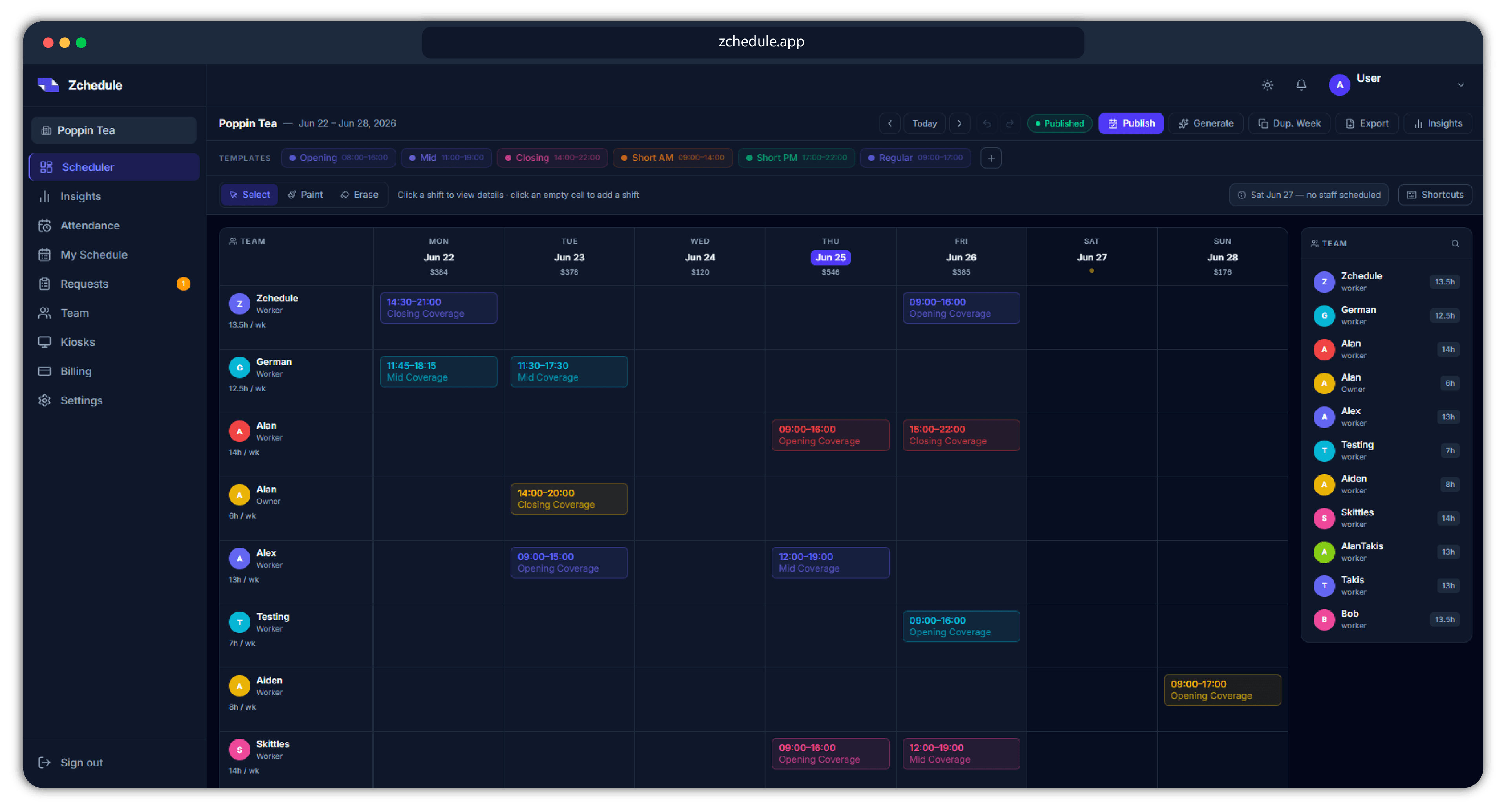
- One price per team, not per person
- Drafts stay hidden from staff until you publish
- iPhone app for the team, web for you
Before you publish
Every week gets checked before your team sees it.
Press Publish and Zchedule reads the whole week back to you first. It scores the schedule out of 100, lists what it found in plain sentences, and waits. You can fix it and run it again, or publish anyway.
Scheduling mistakes rarely announce themselves. A 44-hour week looks fine on the board and shows up in payroll. Someone booked on the Saturday they asked off looks fine until Saturday. This is the step that surfaces both while you can still change them.
Publish Schedule
2 warnings · 1 note
Warnings
Marcus is scheduled for 44h — 4h over the 40h limit
Priya is marked unavailable on this date — Saturday 09:00–15:00
Notes
Sunday has no staff scheduled
Good
No overlapping shifts
All shifts assigned
What it looks for
- Overtime
- Anyone scheduled past their weekly hour limit, with the hours over.
- Availability conflicts
- Shifts that fall on a day off, outside someone's hours, or on a date they blocked out.
- Overlapping shifts
- The same person booked twice at once on the same day.
- Unassigned shifts
- Shifts with nobody on them, including ones left behind when a member leaves.
- Uncovered days
- Days inside a working week with no one scheduled at all.
- Unreviewed drafts
- Generated shifts you haven't opened yet, so nothing slips through untouched.
- Missing pay rates
- Scheduled people with no rate set, which is what throws off the labor number.
Generate
You don't have to start from an empty week.
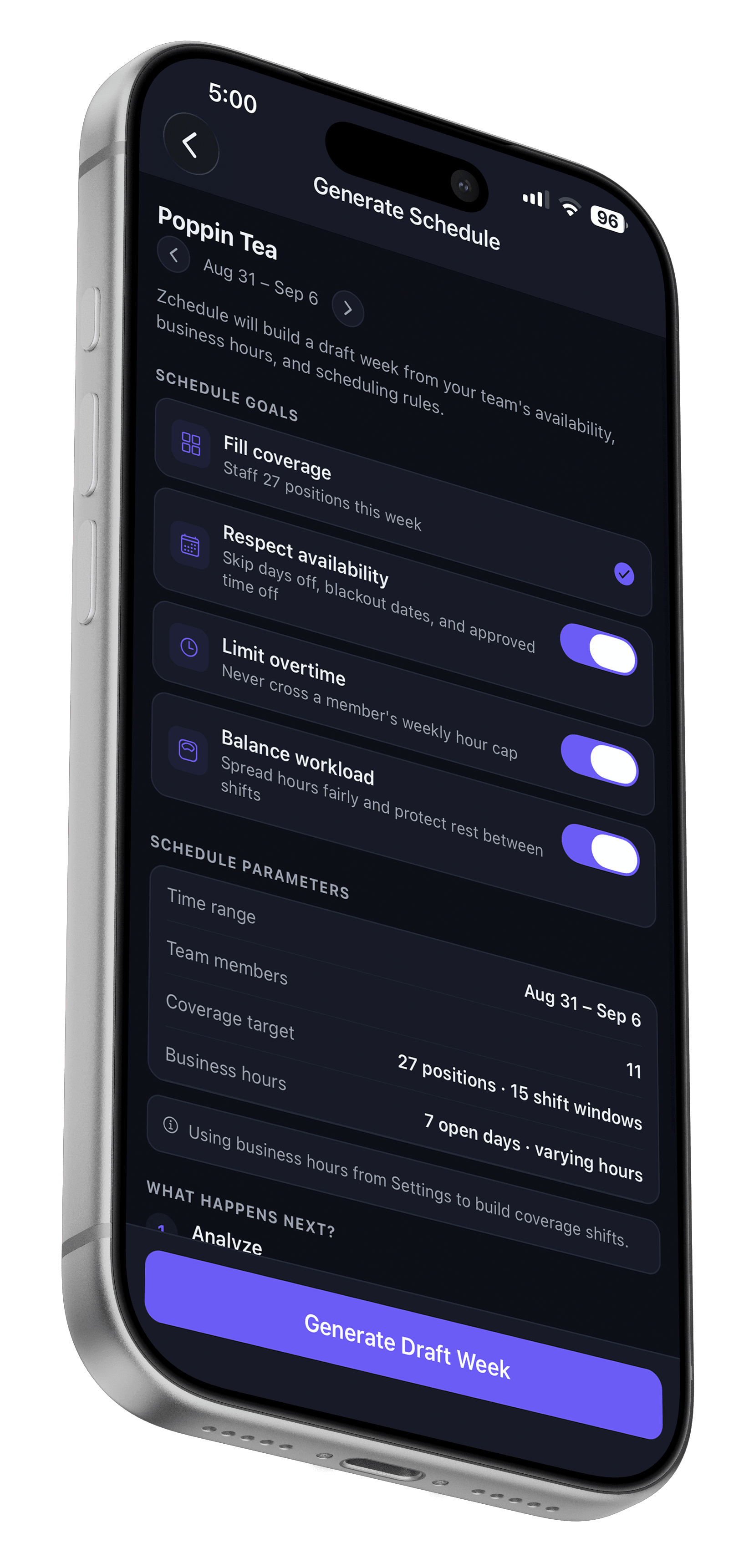
Tell Zchedule when you're open and how many people you need on the floor. It builds the week, you move what you'd rather have somewhere else, and then you publish.
Build Full Week
Starts from your open hours and how many people you need on, and fills all seven days.
Fill Empty Shifts
Leaves what you already placed alone and assigns people to the gaps.
Rebalance Hours
Moves shifts off whoever is loaded up and onto whoever is light.
Reuse Best Week
Takes a week that worked and refits it to who is available this time.
How it picks people
Three switches decide the rules: respect availability, avoid overtime, balance hours fairly. Within those, it ranks each person against the slot by how many hours they already have that week, whether their role fits, which days they normally work, and whether they're full time or part time. Every shift it places carries the reason it chose that person.
Everything it creates arrives as a draft. Your team sees none of it until you publish.
Generating is part of Pro, which every new team gets for 14 days.
What your team sees
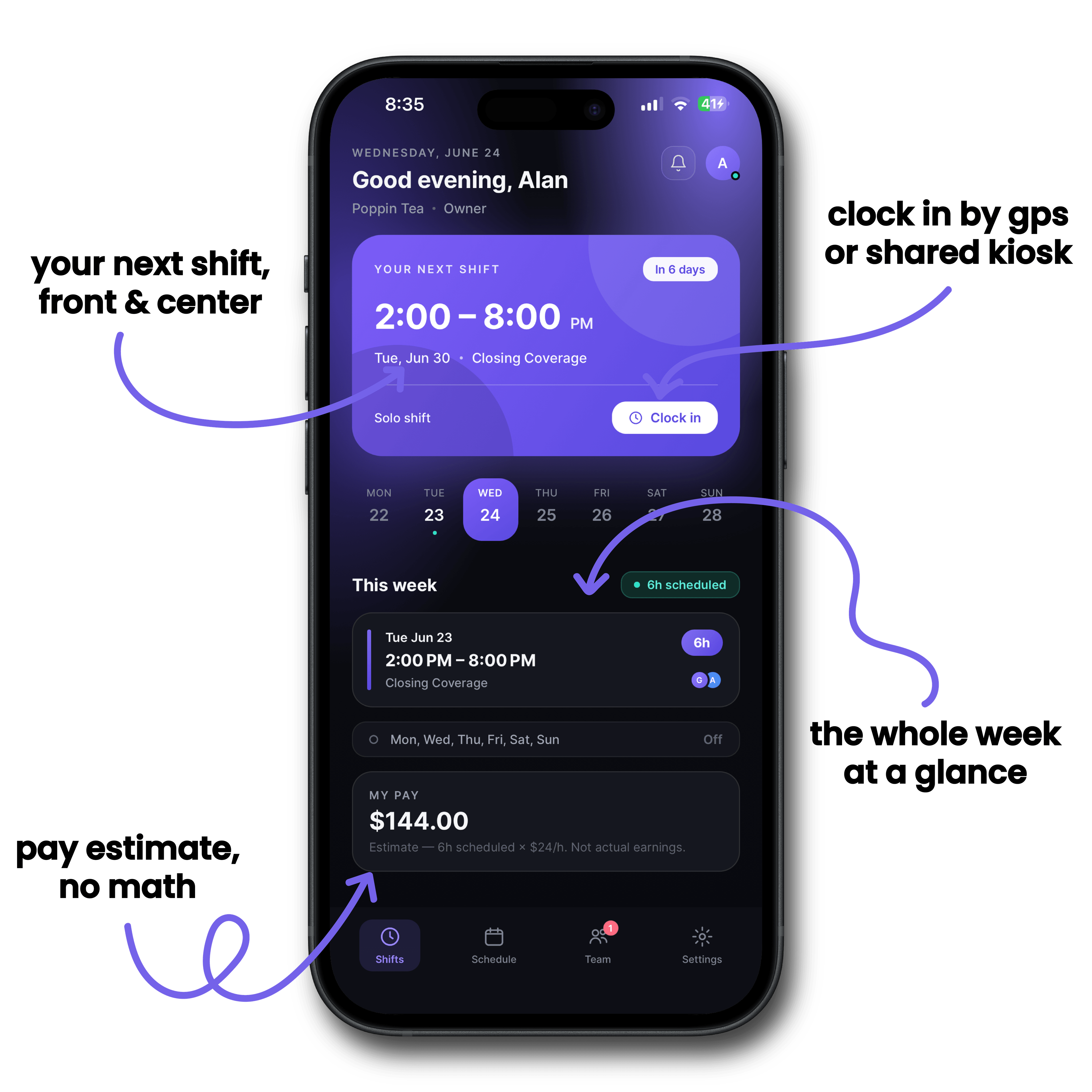
One screen, and it answers the only question they have.
Managers get the full board. Everyone else gets their shifts. There's no setup on their end past logging in, which is the difference between a tool your team uses and one you end up using for them.
- The next shift, then the week
- What's coming up, what the rest of the week looks like, and hours so far.
- The team's schedule
- Who else is on, so nobody has to text around to find out.
- Their own availability
- Weekly hours they can work, plus specific dates they need blocked off.
- Coverage and swap requests
- Raised from the shift itself, not from a group chat at 11pm.
- Notifications
- A new week published, a shift changed, a request answered.
- Clock in and out
- From the phone, or from a shared tablet at the counter.

No iPhone on the team? The same views work in a phone browser.
When plans change
A dropped shift shouldn't cost you an hour of texting.
Somebody's car breaks down on a Thursday. What normally follows is a group chat, four people saying maybe, and you rebuilding the day from memory. Zchedule turns that into three taps and a record of what was agreed.
They ask from the shift
An employee opens the shift they can't work and either asks for coverage or offers it up as a swap. It has to be a published, upcoming shift, so nobody can trade away a day that already happened.
It lands in Requests
Everything waiting on you sits in one list. On a swap you see what it does to both people's hours for the week, and a warning if it pushes either of them into overtime.
You approve, and it's handled
The schedule updates, both people get told, and the week stays correct. Decline and it closes out the same way. Nothing moves until you say so.
Clock-in
Hours that line up with being at work.
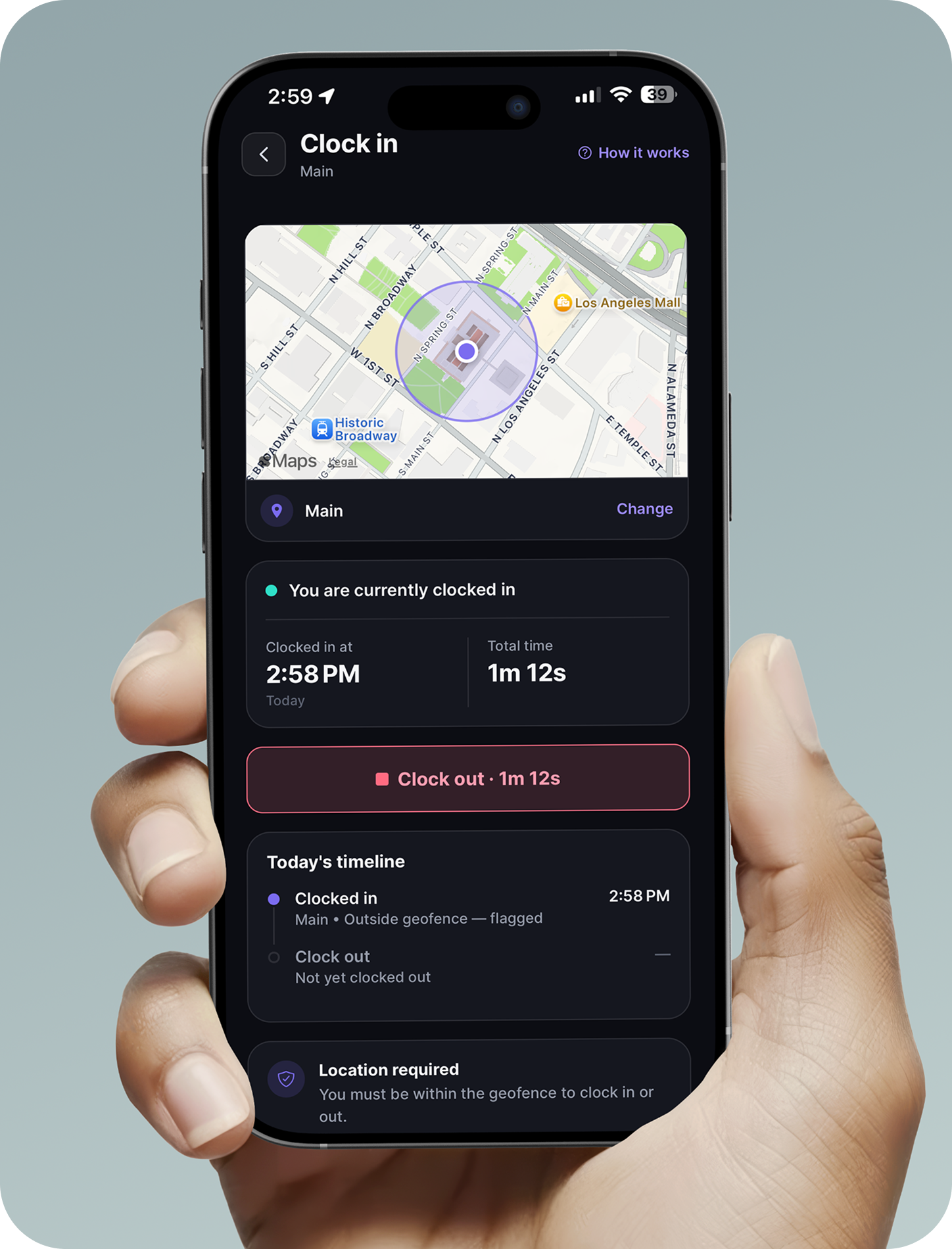
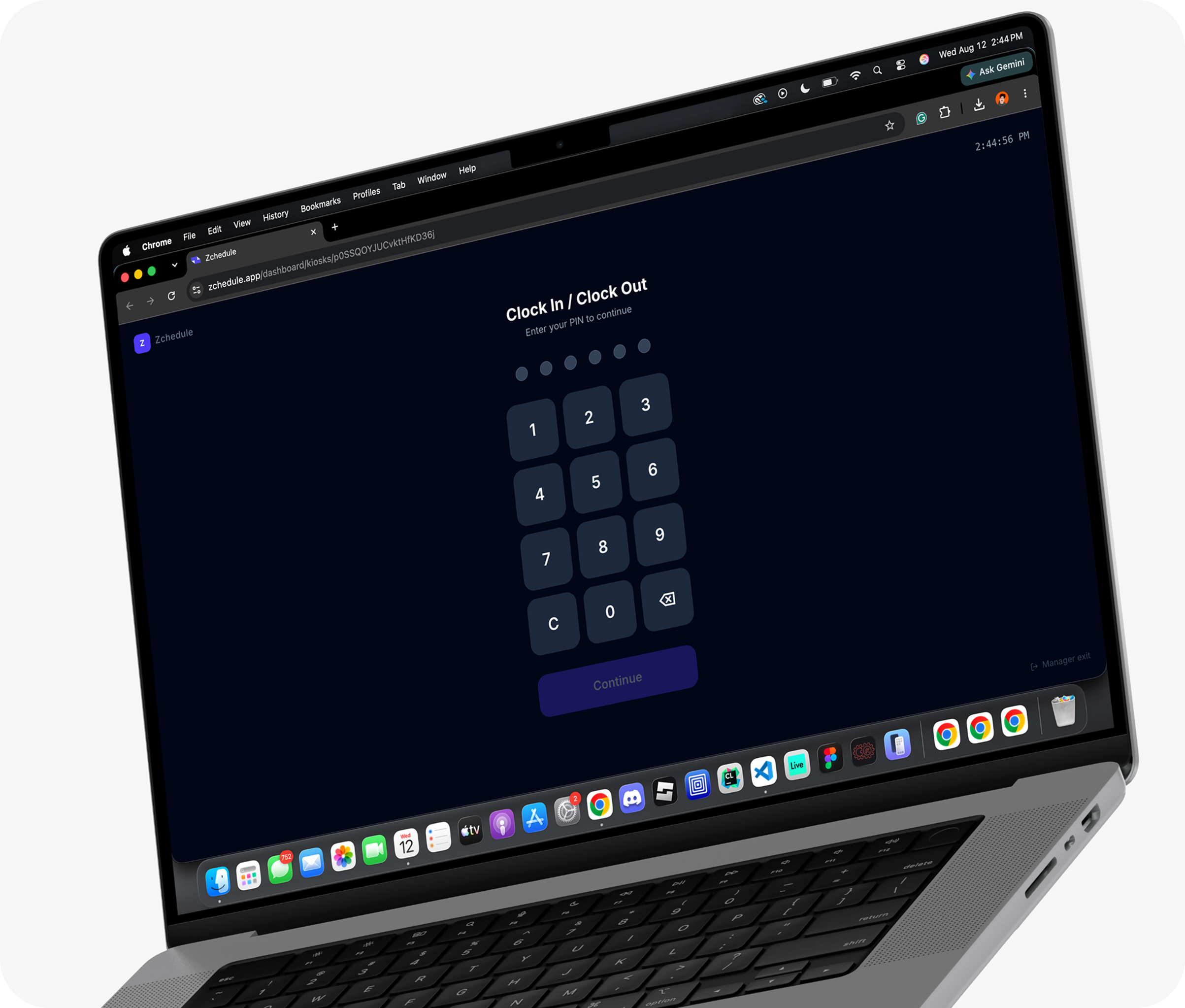
Draw a zone around the shop, pick how strict you want to be, and clock-ins get checked against it. Or skip phones and put a shared tablet on the counter that people punch into with a PIN.
Three levels of strict
- Off
- Location is recorded, nothing is enforced.
- Warn
- An out-of-range punch goes through and is flagged for you.
- Block
- An out-of-range punch is refused, and the employee can ask you to approve it anyway.
Set each zone by address with a radius from 50 feet upward, and apply it to the whole team or to specific people. You can still fix a punch afterwards: timecards are editable, because someone's phone will eventually be dead at 6am.
The weekly loop
The whole product is four steps you repeat once a week.
Most scheduling tools grow a hiring pipeline, a document library and a payroll run around a job that takes forty minutes. Zchedule keeps the job at forty minutes.
Build
Lay out the week
Paint shifts straight onto the board with your saved templates, copy last week over, or have Zchedule generate the draft for you.
Check
Run it before it's real
Overtime, availability conflicts, overlaps, unassigned shifts and empty days come back as a list with a score.
Publish
Send it out
One press puts the week live and notifies the people on it. Until then your team sees the last published version.
Adapt
Handle the week as it moves
Coverage and swap requests arrive in one list. Edit a shift and the people it affects hear about it without you writing a message.
Straight answers
What you're actually signing up for.
- The free plan is a plan, not a countdown
- Up to 10 people, including you, with no expiry and no card on file. Teams that stay small can stay on it.
- Nothing is charged when the trial ends
- 14 days of Pro, starting when you create your first shift. When it runs out you continue on Free with every schedule you built still there.
- The bill doesn't move when the team grows
- Hiring three people changes nothing about what you pay. Most scheduling tools charge per person, which is why they get expensive exactly when you're growing.
- Drafts are private by design
- Employees can only ever read published shifts, so a half-finished week never reaches their app at all. There's no visibility setting to get wrong.
- Only managers can change the schedule
- Everyone else gets a read-only view of the week and their own requests.
- It stops where scheduling stops
- No payroll runs, no HR files, no hiring funnel. That's a decision, and it's why the app opens on your week instead of a dashboard of modules.
Who it's for
Teams where somebody opens and somebody closes.
Zchedule is built for hourly shift work under about a hundred people, where one manager owns the schedule and the week changes after it's posted.
- Restaurants
- Openers, closers, and a Friday night that needs twice the floor.
- Cafes and coffee shops
- 5am starts, split shifts, and one barista who can never do Tuesdays.
- Food trucks
- Two or three people, a different corner every day of the week.
- Retail
- Weekend coverage, stockroom hours, and a December that looks nothing like March.
- Salons and studios
- Chairs and rooms to keep filled, around people who set their own days.
- And plenty that aren't on this list
- Cleaning crews, auto shops, gyms, front desks. If your week is a grid of people and hours, it fits.
Pricing
One price for the team. Adding people doesn't change it.
Every plan is billed per team. A 12-person shop and a 28-person shop on Starter pay the same $19.99.
Yearly works out to ten months, so two are on us.
Free
Everything you need to run a weekly schedule.
$0/month
Up to 10 people, you included
- Weekly schedule board, shift templates and duplicate week
- The publish check, with the health score
- iPhone app and web for the whole team
- Availability and blocked-out dates
- Coverage requests and shift swaps
- Notifications when the week is published or changed
Starter
For teams that also want the hours tracked.
$19.99/month
Up to 30 people
- Everything in Free
- Time clock and attendance
- Labor cost, coverage and attendance reporting
Pro
For teams building the week from scratch every week.
$39.99/month
Unlimited people
- Everything in Starter
- The schedule generator, all four modes
- GPS clock-in zones with warn or block enforcement
- Shared tablet clock-in with PINs
How signing up actually works
You make an account with no card and land on Free. Creating your first shift starts a 14-day run of Pro, so you can generate a week and try the clock-in before deciding anything. When those 14 days are up, nothing is charged and nothing is deleted: you drop back to Free, keep every schedule you built, and the Pro-only tools go quiet until you choose a plan.
FAQ
Questions worth answering up front.
The scheduling part, permanently, for up to 10 people including you. That's the weekly board, templates, duplicating a week, the publish check, availability and blocked-out dates, coverage requests, shift swaps, notifications, and the app for everyone on the team. Time clock and reporting are Starter. The schedule generator and GPS clock-in are Pro.
No. You create an account, build a schedule, and never enter card details unless you decide to pay for Starter or Pro.
When you create your first shift, not when you sign up. Adding your team and setting your hours doesn't burn days off the clock. At the end of the 14 days you aren't charged and nothing is deleted: you continue on Free with every schedule intact, and the Pro features stop until you pick a plan.
There's no per-person fee. The plans have team sizes instead: 10 people on Free, 30 on Starter, unlimited on Pro. Going from 6 people to 26 on Starter costs the same $19.99.
No. Employees can only read published shifts. Drafts, pending edits and shifts you've marked for removal don't reach their app at all, so a half-finished week can't be mistaken for the real one.
Managers build and publish from the web dashboard at zchedule.app, which is where the full board and the generator live. Employees use the iPhone app, or the web on any phone if they're not on iOS.
There's very little for them to do. They accept an invite, log in, and their shifts are on the first screen. No setup, no profile to fill in, nothing to learn before it's useful.
No, and that's on purpose. You get labor cost against the schedule and attendance records you can correct, but there's no payroll run, no HR file, no hiring pipeline. Scheduling is the product.
Next week's schedule is going to get built either way.
Do it in Zchedule and you'll know about the overtime before payroll does, and your team will know their hours before they have to ask.
Free for up to 10 people. No credit card. 14 days of Pro on top.