
Labor cost
See what the week costs while you're building it
Enter an hourly rate for each person. The schedule board shows each day's labor cost as you add shifts, and the labor report compares what you scheduled with what was actually worked.
New teams get 14 days of Pro, which includes the time clock that feeds actual hours.
Updated
Labor Cost
Jun 22 – Jun 28 · per person
Estimated
$1,750.50
Actual
$1,827.35
Variance
+$76.85
| Person | Rate | Sched. h | Actual h | Estimated | Actual | Variance | OT |
|---|---|---|---|---|---|---|---|
| Maya R. | $18.50 | 32.0 | 32.4 | $592.00 | $599.40 | +$7.40 | – |
| Jordan K. | $17.00 | 40.0 | 43.5 | $680.00 | $769.25 | +$89.25 | 3.5h |
| Priya S. | $16.50 | 29.0 | 27.8 | $478.50 | $458.70 | –$19.80 | – |
| Luis M. | No rate | 24.0 | 24.1 | – | – | – | – |
On the schedule
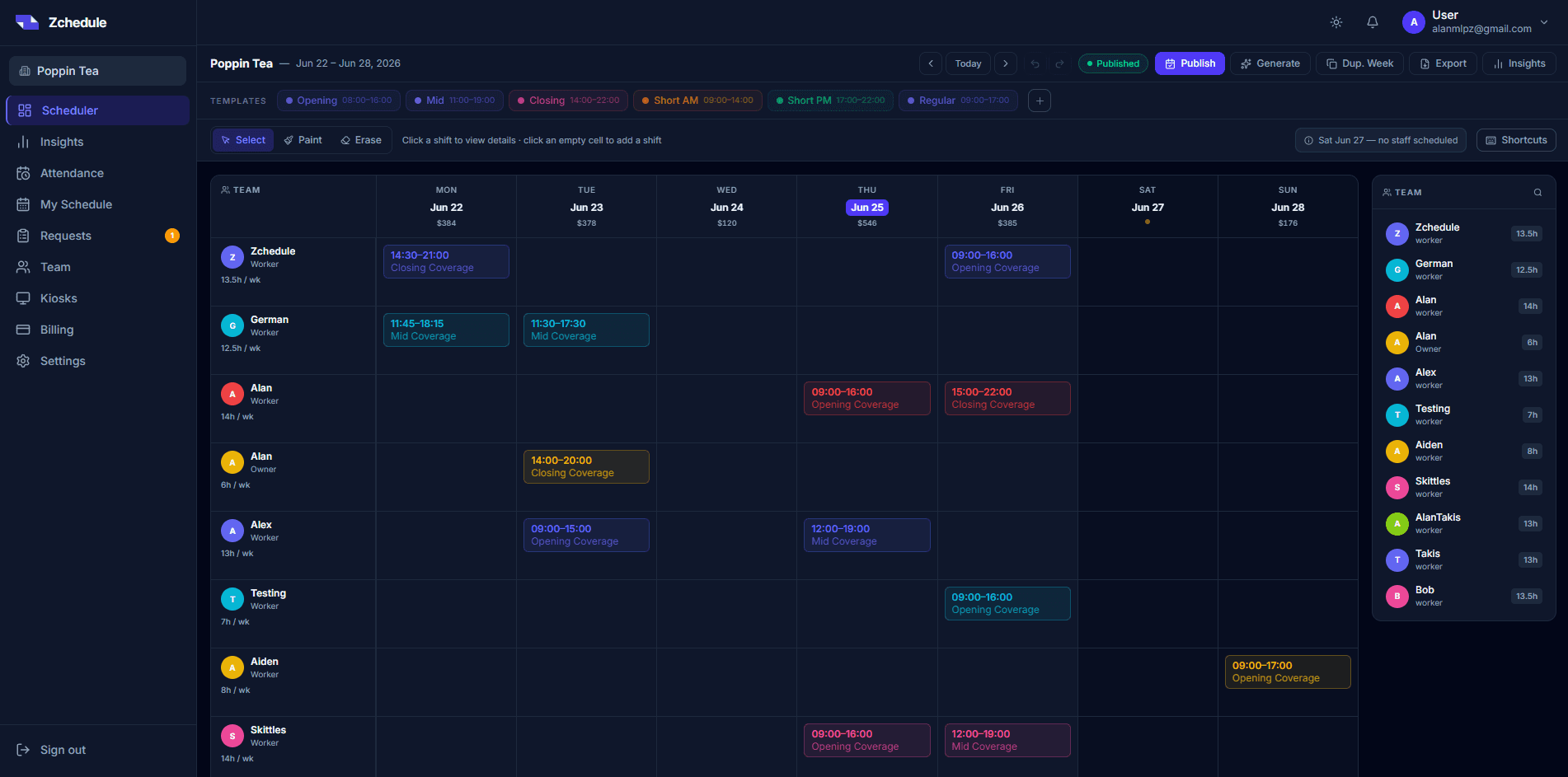
A cost for every day, right on the board.
Each day's column header shows the scheduled cost for that day from the rates you've entered. Move a shift and the number moves with it. If someone on the schedule has no rate, the publish check says so.
The report
Scheduled against actual, for any date range.
- Scheduled
- Published shifts multiplied by each person's rate.
- Actual
- Approved clocked hours, after unpaid breaks, multiplied by the same rate. Tick Include unapproved to preview punches you haven't approved yet.
- Extra cost
- Actual against what was scheduled for the same finished shifts, per person and in total, so a week that ran long is obvious.
- Overtime
- Overtime hours recorded by the time clock, using your daily and weekly thresholds.
- By day, person or role
- Pick a date range, then break the total down by day, person or role and open any row to see its shifts.
- CSV export
- The same figures as a file for your accountant or payroll system.
What it isn't
Hours times rates. Nothing hidden in the number.
Labor cost in Zchedule doesn't include payroll taxes, benefits, tips or overtime premiums, and there's no sales forecast behind it. That keeps the number easy to check: a person's hours multiplied by their rate. Rates aren't kept as a history, so past weeks are priced at each person's current rate. If you enter each day's sales, Insights shows labor as a percentage of sales for the days that have both.
FAQ
Questions worth answering up front.
No. Labor cost is hours multiplied by the hourly rates you enter, before taxes and deductions. It's a report you use to plan and to check against payroll, not a payroll system.
From clocked hours. Each person's approved clocked hours, after unpaid breaks, are multiplied by their rate and set next to what was scheduled. A shift nobody clocked in for isn't counted as worked. You can include unapproved punches to preview them.
Managers and owners only. Rates are never sent to employees' apps.
No. You can type in each day's sales to see labor as a percentage of sales, but Zchedule doesn't predict sales or tell you how many people to schedule. You decide how many people you need; Zchedule shows what that costs.
Related
- Employee scheduling
Build the week on one board, check it, and publish it to your team's phones.
- Attendance tracking
Who is in, who is late, who never showed, and the punches that need a decision.
- How to prevent employee overtime
Where overtime comes from on a small team and how to catch it before the week starts.
- Employee time clock
Clock in from the app, a browser or a shared tablet. Every punch is matched to a shift.
- Restaurants
Front of house and the kitchen on one week, and call-outs posted as open shifts.
- Pricing
Free for small teams, then one flat monthly price per team, not per person.
Know the cost of next week before you publish it.
Add your team and their rates, build the week, and watch the daily totals as you go.
No credit card needed.